
0. 실습 세팅
[1] 프로젝트 정보
| 항목 | 내용 |
| 프로젝트명 | step02_redis_performance |
| group | io.redis |
| package | io.redis.basic |
| 주요 dependency | lombok, Spring Web, Spring Data Redis, DevTools, Spring Data JPA, MySQL Driver |
[2] pom.xml
<?xml version="1.0" encoding="UTF-8"?>
<project xmlns="http://maven.apache.org/POM/4.0.0" xmlns:xsi="http://www.w3.org/2001/XMLSchema-instance"
         xsi:schemaLocation="http://maven.apache.org/POM/4.0.0 https://maven.apache.org/xsd/maven-4.0.0.xsd">
    <modelVersion>4.0.0</modelVersion>
    <parent>
        <groupId>org.springframework.boot</groupId>
        <artifactId>spring-boot-starter-parent</artifactId>
        <version>3.5.3</version>
        <relativePath/> <!-- lookup parent from repository -->
    </parent>
    <groupId>step02_redis_performance</groupId>
    <artifactId>step02_redis_performance</artifactId>
    <version>0.0.1-SNAPSHOT</version>
    <name>step02_redis_performance</name>
    <description>step02_redis_performance</description>
    <url/>
    <licenses>
        <license/>
    </licenses>
    <developers>
        <developer/>
    </developers>
    <scm>
        <connection/>
        <developerConnection/>
        <tag/>
        <url/>
    </scm>
    <properties>
        <java.version>17</java.version>
    </properties>

    <dependencies>
        <dependency>
            <groupId>org.springframework.boot</groupId>
            <artifactId>spring-boot-starter-data-jpa</artifactId>
        </dependency>
        <dependency>
            <groupId>org.springframework.boot</groupId>
            <artifactId>spring-boot-starter-data-redis</artifactId>
        </dependency>
        <dependency>
            <groupId>org.springframework.boot</groupId>
            <artifactId>spring-boot-starter-web</artifactId>
        </dependency>

        <dependency>
            <groupId>org.springframework.boot</groupId>
            <artifactId>spring-boot-devtools</artifactId>
            <scope>runtime</scope>
            <optional>true</optional>
        </dependency>
        <dependency>
            <groupId>com.mysql</groupId>
            <artifactId>mysql-connector-j</artifactId>
            <scope>runtime</scope>
        </dependency>
        <dependency>
            <groupId>org.projectlombok</groupId>
            <artifactId>lombok</artifactId>
            <version>1.18.34</version>
            <optional>true</optional>
        </dependency>
        <dependency>
            <groupId>org.springframework.boot</groupId>
            <artifactId>spring-boot-starter-test</artifactId>
            <scope>test</scope>
        </dependency>
        <dependency>
            <groupId>com.zaxxer</groupId>
            <artifactId>HikariCP</artifactId>
        </dependency>
        <dependency>
            <groupId>org.springframework.boot</groupId>
            <artifactId>spring-boot-starter-actuator</artifactId>
        </dependency>
        <dependency>
            <groupId>io.micrometer</groupId>
            <artifactId>micrometer-registry-prometheus</artifactId>
        </dependency>
        <dependency>
            <groupId>org.springframework.retry</groupId>
            <artifactId>spring-retry</artifactId>
        </dependency>
        <dependency>
            <groupId>org.redisson</groupId>
            <artifactId>redisson-spring-boot-starter</artifactId>
            <version>3.27.2</version>
        </dependency>
        <dependency>
            <groupId>org.springframework.session</groupId>
            <artifactId>spring-session-data-redis</artifactId>
        </dependency>
        <dependency>
            <groupId>com.fasterxml.jackson.datatype</groupId>
            <artifactId>jackson-datatype-jsr310</artifactId>
        </dependency>
    </dependencies>


    <build>
        <plugins>
            <plugin>
                <groupId>org.apache.maven.plugins</groupId>
                <artifactId>maven-compiler-plugin</artifactId>
                <configuration>
                    <annotationProcessorPaths>
                        <path>
                            <groupId>org.projectlombok</groupId>
                            <artifactId>lombok</artifactId>
                            <version>1.18.34</version>
                        </path>
                    </annotationProcessorPaths>
                </configuration>
            </plugin>
            <plugin>
                <groupId>org.springframework.boot</groupId>
                <artifactId>spring-boot-maven-plugin</artifactId>
                <configuration>
                    <excludes>
                        <exclude>
                            <groupId>org.projectlombok</groupId>
                            <artifactId>lombok</artifactId>
                        </exclude>
                    </excludes>
                </configuration>
            </plugin>
        </plugins>
    </build>

</project>
[3] application.properties
spring.application.name=step02_redis_performance

# Server Configuration
server.port=8083

# Redis Configuration
spring.data.redis.host=127.0.0.1
spring.data.redis.client-name=default
spring.data.redis.password=redis1234
spring.data.redis.port=6379
spring.data.redis.timeout=2000
spring.data.redis.lettuce.pool.max-active=8
spring.data.redis.lettuce.pool.max-idle=8
spring.data.redis.lettuce.pool.min-idle=0
spring.data.redis.lettuce.pool.max-wait=-1

# Datasource
spring.datasource.url=jdbc:mysql://127.0.0.1:3307/testdb?useSSL=false&serverTimezone=Asia/Seoul
spring.datasource.username=testuser
spring.datasource.password=testpass
spring.datasource.hikari.maximum-pool-size=20
spring.datasource.hikari.minimum-idle=10
spring.datasource.hikari.connection-timeout=30000
spring.datasource.hikari.idle-timeout=600000
spring.datasource.hikari.max-lifetime=1800000

# JPA / Hibernate
spring.jpa.hibernate.ddl-auto=update
spring.jpa.properties.hibernate.dialect=org.hibernate.dialect.MySQL8Dialect
spring.jpa.properties.hibernate.format_sql=true
spring.jpa.show-sql=false

# Actuator / Management
#management.endpoints.web.exposure.include=health,info,metrics,prometheus
#management.metrics.export.prometheus.enabled=true

# Logging Configuration
logging.level.root=INFO
logging.level.io.lettuce.core=DEBUG
logging.level.org.springframework.data.redis=DEBUG
logging.level.io.redis.performance.service.CacheAsideService=INFO
1. 캐시 전략
애플리케이션의 성능을 높이기 위해 캐시는 필수적으로 사용된다. 특히 데이터베이스 조회에 소요되는 비용을 줄이기 위한 패턴들이 잘 정립돼 있다. 대표적인 캐시 전략 3가지에 대해 알아보자.
1.1. Cache-Aside (Lazy Loading, 수동 캐싱)
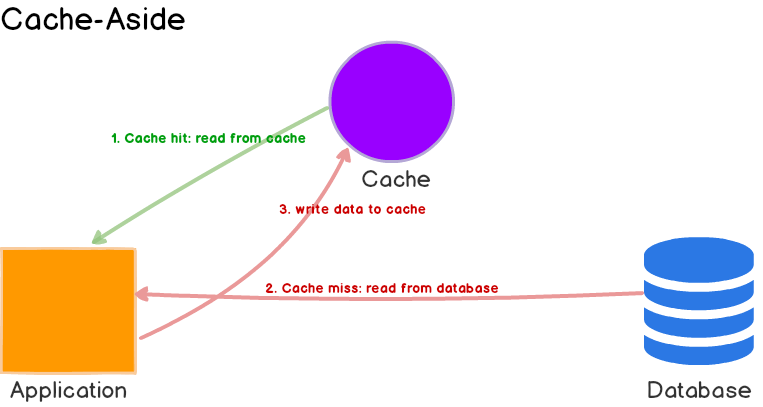
🔁 동작 흐름
[1] 애플리케이션이 데이터를 요청한다.
[2] 캐시에 해당 데이터가 없다면(DB 조회가 필요하다는 의미), DB에서 데이터를 조회한다.
[3] 조회한 데이터를 캐시에 저장한다.
[4] 이후 같은 요청이 오면 캐시에서 데이터를 바로 제공한다.
📌 특징
[1] 캐시는 요청이 있을 때만 채워진다. 즉, 필요할 때(on-demand)만 데이터를 로드한다.
[2] DB가 항상 진실의 근원(Source of Truth) 역할을 한다.
[3] 캐시 만료, 삭제 등의 정책은 애플리케이션이 직접 제어해야 한다.
✅ 장점
[1] 구조가 간단하고 유연하다.
[2] 실제로 사용되는 데이터만 캐시에 올라가므로 메모리를 효율적으로 사용할 수 있다.
⚠️ 단점
[1] 첫 번째 요청은 반드시 DB를 조회해야 하므로 캐시 미스 비용이 발생한다.
[2] 캐시에 데이터가 존재한다면, DB에 업데이트가 발생하더라도 기존 캐시의 값을 가져오기 때문에 데이터 정합성 문제가 발생할 수 있다. 따라서 DB 업데이트가 발생하면 기존 캐시 값에 대한 무효화 처리(로직)를 해주어야 한다.
[2] 캐시 무효화 로직이 여러 곳에 흩어질 수 있어 유지보수가 어려워질 수 있다.
1.2. Write-Through

🔁 동작 흐름
[1] 애플리케이션이 데이터를 저장 요청하면, 우선 캐시에 값을 기록한다.
[2] 캐시는 이 데이터를 DB에도 동시에 기록한다.
📌 특징
[1] 캐시와 DB가 항상 동일한 데이터를 유지한다. 모든 쓰기 작업이 동기적으로 두 저장소에 반영된다.
[2] 데이터를 쓸 때부터 캐시에 존재하므로, 이후 읽기 요청 시 캐시 히트율이 높다.
✅장점
[1] 데이터 일관성 유지가 쉽다.
[2] 쓰기 직후부터 캐시에 데이터가 있어 읽기 성능이 뛰어나다.
⚠️ 단점
[1] 캐시와 DB 모두에 쓰기를 해야 하므로, 전체적인 쓰기 성능은 느릴 수 있다.
[2] DB에 문제가 생기면 쓰기 요청 자체가 실패할 가능성이 있다.
1.3. Write-Behind (Write-Back)

🔁 동작 흐름
[1] 애플리케이션은 캐시에 데이터를 먼저 기록한다.
[2] DB에는 바로 반영되지 않고, 배치 또는 비동기 처리 방식으로 일정 시간 뒤에 업데이트된다.
📌 특징
[1] 캐시가 모든 쓰기 작업의 진입점이 되며, DB는 나중에 업데이트된다.
[2] 비동기적이기 때문에 즉각적인 DB 반영은 이뤄지지 않는다.
✅ 장점
[1] 애플리케이션 입장에서 쓰기 속도가 매우 빠르다.
[2] 대량의 쓰기 작업을 묶어서 처리함으로써 DB에 대한 I/O 부하를 줄일 수 있다.
⚠️ 단점
[1] 캐시와 DB의 데이터가 일시적으로 불일치할 수 있다.
[2] 캐시에 저장된 데이터를 DB에 반영하기 전에 캐시가 손실되면 데이터 유실 위험이 있다.
[3] 장애 발생 시 복구 및 재처리 로직이 반드시 필요하다.
2. 실습(1): 캐시
2.1. 실습 환경 구축
[1] docker-compose.yaml 정의 (redis, redis insight, mysql 생성)
vi docker-compose.yaml---
version: '3.8'
services:
redis:
image: redis:latest
container_name: redis
restart: always
command: redis-server --requirepass redis1234
volumes:
- redis_volume_data:/data
ports:
- 6379:6379
redis-insight:
image: redislabs/redisinsight:latest
container_name: redis_insight
restart: always
ports:
- 5540:5540
volumes:
- redis_insight_volume_data:/db
mysql-server:
image: mysql:8.0
container_name: mysql-server
ports:
- 3306:3306
environment:
MYSQL_ROOT_PASSWORD: rootpassword
MYSQL_DATABASE: testdb
MYSQL_USER: testuser
MYSQL_PASSWORD: testpass
volumes:
- mysql_volume_data:/var/lib/mysql
command: --default-authentication-plugin=mysql_native_password
volumes:
redis_volume_data:
redis_insight_volume_data:
mysql_volume_data:docker-compose up -d
⚠️ 오류 발생 시, 행동 요령
아래와 같은 오류가 발생했다면, 이전에 ubuntu 내에서 mysql을 설치한 적이 있기 때문이다.

확실히 알아보기 위해 `netstat -nlpt` 명령어를 수행해보자. 역시나 3306 포트를 이미 점유하고 있다.

일반적으로는 `sudo systemctl stop mysql`을 수행하되, 만약 ubuntu 내에서 mysql을 사용할 일이 없다면 `sudo systemctl disable mysql` 명령어를 수행하자. 이제 ubuntu를 껐다 켜도 mysql server가 자동으로 실행되지 않기 때문에 3306 포트를 점유하지 않는다.

[2] 로컬 접속


[3] Redis Configuration 작성
io/redis/performance/config/RedisConfig.java
@Configuration
@EnableCaching // 캐시 활성화
public class RedisConfig {

    @Value("${spring.data.redis.host}")
    private String host;

    @Value("${spring.data.redis.port}")
    private int port;

    @Value("${spring.data.redis.password}")
    String password;

    // Redis 커넥션 객체 생성
    @Bean
    public LettuceConnectionFactory redisConnectionFactory() {
        RedisStandaloneConfiguration config = new RedisStandaloneConfiguration(host, port);
        config.setPassword(password);
        return new LettuceConnectionFactory(config);
    }

    @Bean
    public RedisTemplate<String, Object> redisTemplate(RedisConnectionFactory connectionFactory) {
        RedisTemplate<String, Object> template = new RedisTemplate<>();
        template.setConnectionFactory(connectionFactory);

        // Object Mapper
        ObjectMapper mapper = new ObjectMapper();
        mapper.registerModule(new JavaTimeModule());
        mapper.disable(SerializationFeature.WRITE_DATES_AS_TIMESTAMPS);

        GenericJackson2JsonRedisSerializer serializer = new GenericJackson2JsonRedisSerializer(mapper);

        // 객체 값을 Json 형식으로 변환해주는 시리얼라이저
        template.setKeySerializer(new StringRedisSerializer());
        template.setValueSerializer(serializer);
        template.setHashKeySerializer(new StringRedisSerializer());
        template.setHashValueSerializer(serializer);

        template.afterPropertiesSet();
        return template;
    }

    // Key와 Value가 모두 String일 때 사용하는 간편 템플릿
    @Bean
    public StringRedisTemplate stringRedisTemplate() {
        StringRedisTemplate template = new StringRedisTemplate();
        template.setConnectionFactory(redisConnectionFactory());
        return template;
    }

    @Bean
    public ObjectMapper objectMapper() {
        ObjectMapper mapper = new ObjectMapper();
        mapper.registerModule(new JavaTimeModule());
        mapper.disable(SerializationFeature.WRITE_DATES_AS_TIMESTAMPS);
        return mapper;
    }
}
2.2. Cache-Aside 구현
클라이언트가 데이터를 요청하면 캐시에 먼저 조회를 한다. 만약 데이터가 없으면 DB를 조회하고 캐시에 저장한다. 데이터 수정 시 DB 갱신 후 캐시 무효화 (invalidate)를 수행한다.
2.2.1. Entity 작성
io/redis/performance/entity/User.java
@Entity
@Data
@AllArgsConstructor
@NoArgsConstructor
public class User {
    @Id
    private Long id;
    private String name;
    private LocalDateTime lastLogin;
}
2.2.2. Repository 작성
io/redis/performance/repository/UserRepository.java
@Repository
public interface UserRepository extends JpaRepository<User, Long> {

    List<User> findTop100ByOrderByLastLoginDesc();

}
2.2.3. Service 작성
io/redis/performance/service/CacheAsideService.java
@Service
@RequiredArgsConstructor
@Slf4j
public class CacheAsideService {

    private final RedisTemplate<String, Object> redisTemplate;
    private final ObjectMapper objectMapper;  // 주입!
    private final UserRepository userRepository;

    private static final String USER_CACHE_KEY = "user:";
    private static final long CACHE_TTL = 3600; // 3600초

    /**
     * [1] Redis로부터 사용자 데이터 조회
     * ㄴ 키에 대해 유저가 존재하면 Object로 받아와서 User 객체로 변환
     * ㄴ 객체의 존재 유무 확인
     * ㄴ 존재하지 않으면 캐시 미스 발생 -> DB에 있는 정보에서 가져와서 Redis에 저장
     */
    public User getUser(Long userId) {
        String key = USER_CACHE_KEY + userId;

        Object cachedObj = redisTemplate.opsForValue().get(key);
        if (cachedObj instanceof User) {
            log.info("Cache hit for user: {}", userId);
            return (User) cachedObj;
        } else if (cachedObj instanceof LinkedHashMap) {
            User user = objectMapper.convertValue(cachedObj, User.class);
            log.info("Cache hit (converted) for user: {}", userId);
            return user;
        } else if (cachedObj != null) {
            log.warn("Unexpected type in cache for user: {}, type: {}", userId, cachedObj.getClass());
            throw new IllegalStateException("Unexpected cache type for user: " + userId);
        }

        log.info("Cache miss for user: {}", userId);
        User user = userRepository.findById(userId)
                .orElseThrow(() -> new NoSuchElementException("User not found"));
        redisTemplate.opsForValue().set(key, user, CACHE_TTL, TimeUnit.SECONDS);
        return user;
    }

    /**
     * [2] DB 업데이트
     * ㄴ DB에 업데이트 하면, 원래 캐시에 있던 값이 필요 없음 -> 캐시 값 무효화
     */
    public User updateUser(Long userId, User updatedUser) {
        // DB 업데이트
        User savedUser = userRepository.save(updatedUser);

        // 캐시 무효화
        String key = USER_CACHE_KEY + userId;
        redisTemplate.delete(key);

        return savedUser;
    }

    /**
     * [3] 캐시 워밍
     * ㄴ 서버 시작 시, 캐시 설정
     */
    @PostConstruct
    public void warmUpCache() {
        List<User> activeUsers = userRepository.findTop100ByOrderByLastLoginDesc();
        activeUsers.forEach(user -> {
            String key = USER_CACHE_KEY + user.getId();
            redisTemplate.opsForValue().set(key, user, CACHE_TTL, TimeUnit.SECONDS);
        });
        log.info("Cache warmed up with {} users", activeUsers.size());
    }
}
2.2.4. Controller 작성
io/redis/performance/controller/CacheAsideController.java
@RestController
@RequiredArgsConstructor
@RequestMapping("/api/cache-aside")
public class CacheAsideController {
    private final CacheAsideService cacheAsideService;

    @GetMapping("/user/{id}")
    public User getUser(@PathVariable Long id) {
        return cacheAsideService.getUser(id);
    }

    @PutMapping("/user/{id}")
    public User updateUser(@PathVariable Long id, @RequestBody User user) {
        return cacheAsideService.updateUser(id, user);
    }
}
2.2.5. 서버 실행
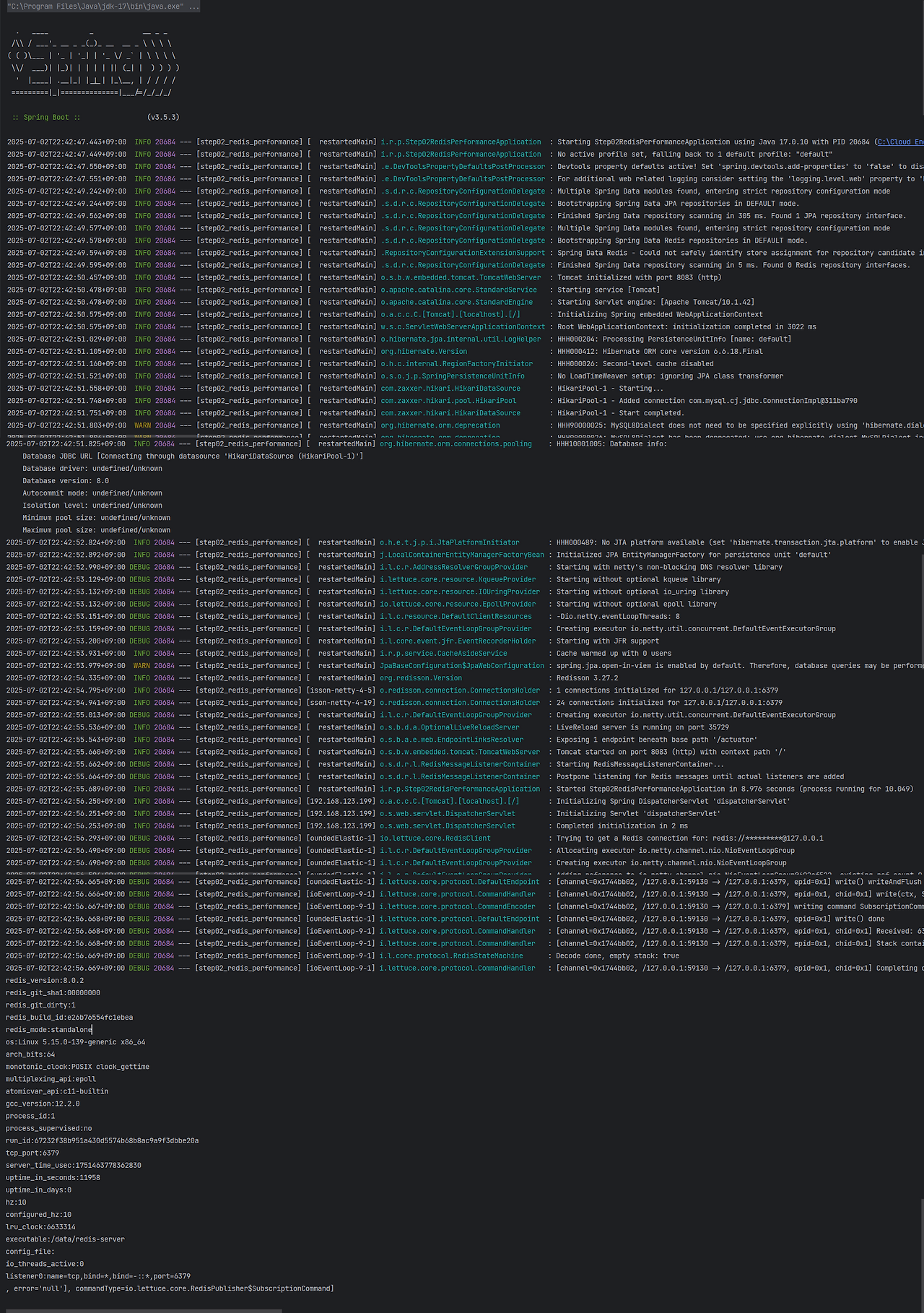
서버 실행 후 아래 사진과 같이 뜨면 정상 작동 중인것이다.
2.2.6. 테스트용 데이터 설정
Cache-Aside에서는 캐시에 데이터가 없으면 캐시미스가 발생하면서 DB 조회가 수행된다. 만약 DB에도 데이터가 없으면 예외가 발생하기 때문에 Exception을 방지하기 위해 User Entity에 초기데이터를 설정해놓자.
USE testdb;
SELECT * FROM user;
INSERT INTO user VALUES(1, now(), 'user1');
2.2.7. 테스트(1): 유저 조회
[1] POSTMAN을 이용하여 데이터베이스에 존재하는 유저 조회
http://localhost:8083/api/cache-aside/user/1

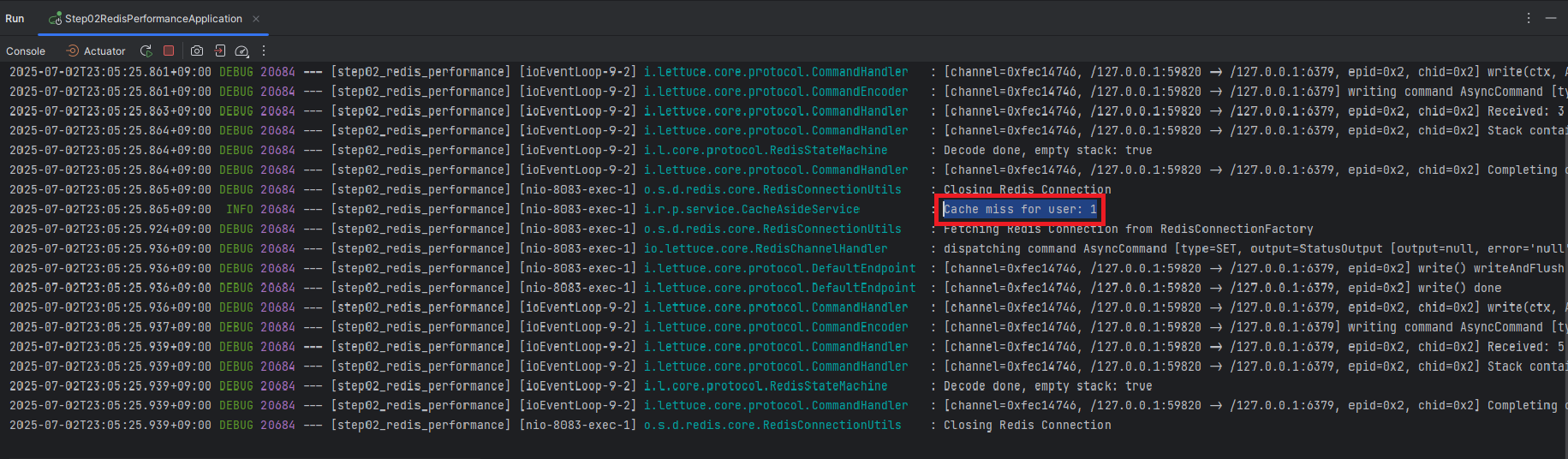
id가 1인 유저에 대한 첫 번째 조회이기 때문에 캐시에 데이터가 존재하지 않는다. 즉, "캐시미스"가 발생해야 하는데, 아래 사진을 보면 콘솔에 `Cache miss for user: 1`이라는 로그가 출력된 것을 확인할 수 있다.
[2] 캐시(Redis) 확인
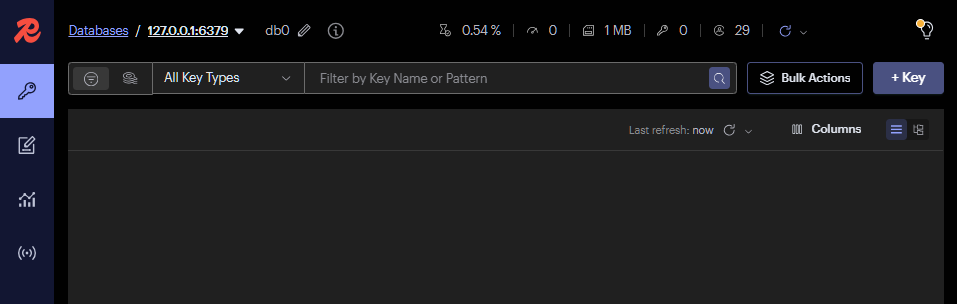
캐시에 데이터가 없기 때문에 데이터베이스로부터 id가 1인 유저를 조회하고, 해당 데이터들을 다시 캐시에 저장한다. 실제로 캐시역할을 하고 있는 Redis에 데이터가 저장 되었는지 Redis Insight를 확인해보면 잘 저장되어있다.

[3] 유저 재조회
유저를 다시한번 조회하게 되면, 캐시(Redis)에 해당 데이터가 있기 때문에 DB 조회가 발생하지 않는다. 실제 실행 콘솔 창을 보면 `Cache miss` 대신에 `Cache hit` 대한 내용이 출력되는 것을 확인할 수 있다.

2.2.8. 테스트(2): 유저 업데이트
Cache-Aside의 단점으로 "DB 업데이트가 발생하면 기존 캐시 값에 대한 무효화 처리(로직)를 해주어야 한다."라고 앞서 설명하였다. 우리는 Service에서 이미 DB 업데이트 시 캐시 무효화 로직을 작성하였다. 실제로 유저의 데이터를 업데이트 했을 때, 캐시(Redis) 무효화가 진행되는지 확인해보자.
[1] 데이터베이스 존재하는 유저 데이터 업데이트
http://localhost:8083/api/cache-aside/user/1

[2] DB(MySQL) 확인

[3] 캐시(Redis) 확인
2.3. Write-Through
2.2.1. Entity 작성
io/redis/performance/entity/Product.java
@Entity
@Data
@AllArgsConstructor
@NoArgsConstructor
public class Product {
    @Id
    private Long id;
    private String name;
    private int price;
}
2.2.2. Repository 작성
io/redis/performance/repository/ProductRepository.java
@Repository
public interface ProductRepository extends JpaRepository<Product, Long> {

}
2.2.3. Service 작성
io/redis/performance/service/WriteThroughService.java
@Service
@RequiredArgsConstructor
@Slf4j
public class WriteThroughService {

    private final RedisTemplate<String, Object> redisTemplate;
    private final ProductRepository productRepository;
    private final ObjectMapper objectMapper;  // 주입!

    private static final String PRODUCT_CACHE_KEY = "product:";

    public Product saveProduct(Product product) {
        // 1. DB에 저장
        Product savedProduct = productRepository.save(product);

        // 2. 동시에 캐시에도 저장
        String key = PRODUCT_CACHE_KEY + savedProduct.getId();
        redisTemplate.opsForValue().set(key, savedProduct);

        log.info("Product saved to DB and cache: {}", savedProduct.getId());
        return savedProduct;
    }

    public Product getProduct(Long productId) {
        String key = PRODUCT_CACHE_KEY + productId;

        // 캐시에서 먼저 조회
//        Product cachedProduct = (Product) redisTemplate.opsForValue().get(key);
        Object cachedProduct = redisTemplate.opsForValue().get(key);
        if (cachedProduct instanceof Product) {
            log.info("Cache hit for product: {}", productId);
            return (Product) cachedProduct;
        } else if (cachedProduct instanceof LinkedHashMap) {
            Product product = objectMapper.convertValue(cachedProduct, Product.class);
            log.info("Cache hit (converted) for product: {}", productId);
            return product;
        } else if (cachedProduct != null) {
            log.warn("Unexpected type in cache for product: {}, type: {}", productId, cachedProduct.getClass());
            throw new IllegalStateException("Unexpected cache type for product: " + productId);
        }

        // 캐시 미스 시 DB 조회 후 캐시 저장
        Product product = productRepository.findById(productId)
                .orElseThrow(() -> new NoSuchElementException("Product not found"));

        redisTemplate.opsForValue().set(key, product);
        return product;
    }

    // 벌크 업데이트 with 트랜잭션
    @Transactional
    public List<Product> bulkUpdateProducts(List<Product> products) {
        List<Product> savedProducts = new ArrayList<>();

        // Pipeline을 사용한 효율적인 캐시 업데이트
        redisTemplate.executePipelined((RedisCallback<Object>) connection -> {
            products.forEach(product -> {
                Product saved = productRepository.save(product);
                savedProducts.add(saved);

                String key = PRODUCT_CACHE_KEY + saved.getId();
                byte[] keyBytes = key.getBytes();
                byte[] valueBytes = serialize(saved);
                connection.set(keyBytes, valueBytes);
            });
            return null;
        });

        return savedProducts;
    }

    private byte[] serialize(Object obj) {
        // 객체 직렬화 로직
        return new GenericJackson2JsonRedisSerializer().serialize(obj);
    }
}
2.2.4. Controller 작성
io/redis/performance/controller/WriteThroughController.java
@RestController
@RequiredArgsConstructor
@RequestMapping("/api/write-through")
public class WriteThroughController {
    private final WriteThroughService writeThroughService;

    @PostMapping("/product")
    public Product saveProduct(@RequestBody Product product) {
        return writeThroughService.saveProduct(product);
    }

    @GetMapping("/product/{id}")
    public Product getProduct(@PathVariable Long id) {
        return writeThroughService.getProduct(id);
    }
}
2.2.5. Write-Through 테스트
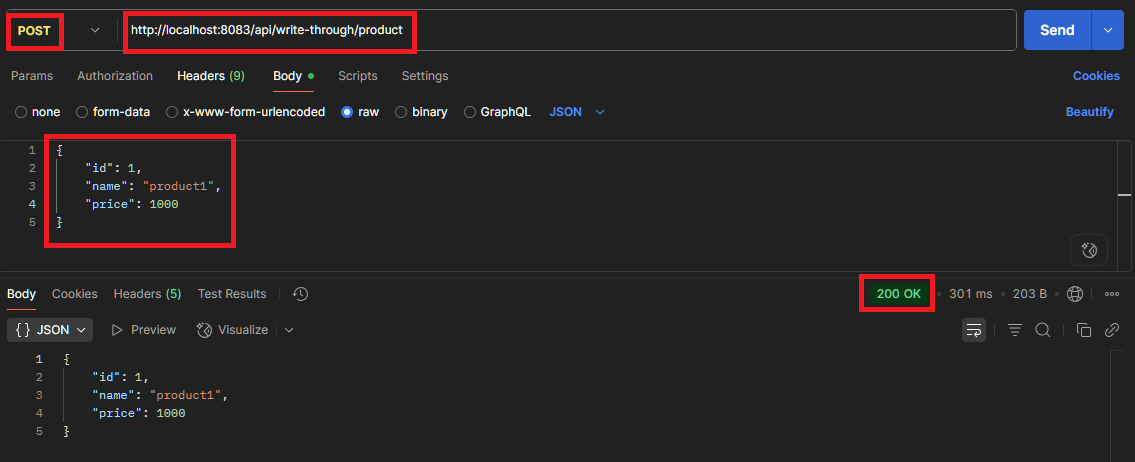
Write-Through는 데이터 저장 시, DB와 캐시 모두 데이터가 저장된다. 실제 데이터를 저장하는 API를 호출해서 결과를 확인해보자.
[1] Product 생성
http://localhost:8083/api/write-through/product
[2] DB(MySQL) 확인

[3] 캐시(Redis) 확인

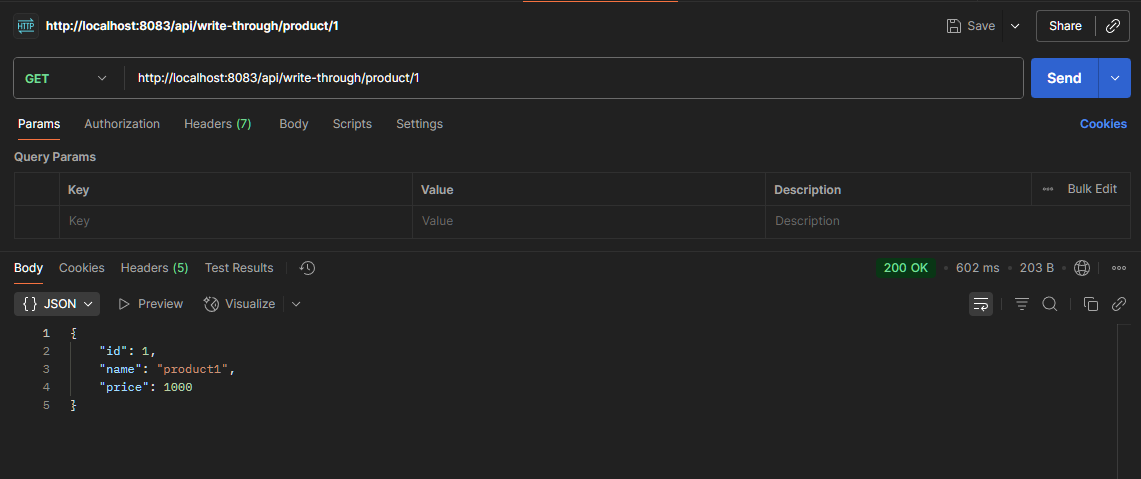
[4] 데이터 조회
http://localhost:8083/api/write-through/product/1

2.4. Write-Behind
클라이언트가 뷰카운트 증가를 요청하고, Redis에만 업데이트 한 후, dirty set에 기록한다. 스케줄러가 일정 주기마다 DB로 동기화를 수행한다.
2.4.1. Entity 작성
@Entity
@Data
@AllArgsConstructor
@NoArgsConstructor
public class ViewCount {
    @Id
    private Long id;
    private Long count;
}
2.4.2. Repository 작성
@Repository
public interface ViewCountRepository extends JpaRepository<ViewCount, Long> {

}
2.4.3. Service 작성
@Service
@RequiredArgsConstructor
@Slf4j
public class WriteBehindService {

    private final RedisTemplate<String, Object> redisTemplate;
    private final ViewCountRepository viewCountRepository;
    private final ScheduledExecutorService scheduler = Executors.newScheduledThreadPool(1);

    private static final String VIEW_COUNT_KEY = "view:count:";
    private static final String DIRTY_SET_KEY = "dirty:viewcounts";

    @PostConstruct
    public void init() {
        // 주기적으로 더티 데이터를 DB에 동기화
        scheduler.scheduleWithFixedDelay(this::syncToDatabase,
                60, 60, TimeUnit.SECONDS); // 1분마다 실행
    }

    public void incrementViewCount(Long contentId) {
        String key = VIEW_COUNT_KEY + contentId;

        // 1. Redis에만 업데이트
        Long newCount = redisTemplate.opsForValue().increment(key);

        // 2. 더티 세트에 추가 (캐시에만 저장되어 있고, RDBMS에는 적용하기 전의 데이터 세트) : 나중에 DB 동기화할 항목)
        redisTemplate.opsForSet().add(DIRTY_SET_KEY, contentId);

        log.debug("View count incremented in cache: {} -> {}", contentId, newCount);
    }

    public Long getViewCount(Long contentId) {
        String key = VIEW_COUNT_KEY + contentId;

        // Redis에서 조회
        Object count = redisTemplate.opsForValue().get(key);
        if (count != null) {
            return Long.parseLong(count.toString());
        }

        // 캐시 미스 시 DB에서 조회
        ViewCount viewCount = viewCountRepository.findById(contentId)
                .orElse(new ViewCount(contentId, 0L));

        // 캐시에 저장
        redisTemplate.opsForValue().set(key, viewCount.getCount());

        return viewCount.getCount();
    }

    private void syncToDatabase() {
        // count: 한번에 처리할 수 있는 양 -> batch_size (batch_limit)
        // distinctRandomMembers(Key key, long count)
        Set<Object> dirtyIds = redisTemplate.opsForSet().members(DIRTY_SET_KEY);

        if (dirtyIds.isEmpty()) {
            return;
        }

        log.info("Syncing {} view counts to database", dirtyIds.size());

        List<ViewCount> toUpdate = new ArrayList<>();

        // 배치로 처리
        dirtyIds.forEach(id -> {
            Long contentId = Long.parseLong(id.toString());
            String key = VIEW_COUNT_KEY + contentId;
            Object count = redisTemplate.opsForValue().get(key);

            if (count != null) {
                toUpdate.add(new ViewCount(contentId, Long.parseLong(count.toString())));
            }
        });

        // 배치 업데이트
        viewCountRepository.saveAll(toUpdate);

        // 더티 세트 클리어
        redisTemplate.delete(DIRTY_SET_KEY);

        log.info("Successfully synced {} view counts", toUpdate.size());
    }

    @PreDestroy
    public void cleanup() {
        // 애플리케이션 종료 시 강제 동기화
        syncToDatabase();
        scheduler.shutdown();
    }
}
2.4.4. Controller 작성
@RestController
@RequiredArgsConstructor
@RequestMapping("/api/write-behind")
public class WriteBehindController {
    private final WriteBehindService writeBehindService;

    @PostMapping("/view/{id}")
    public void increment(@PathVariable Long id) {
        writeBehindService.incrementViewCount(id);
    }

    @GetMapping("/view/{id}")
    public Long getView(@PathVariable Long id) {
        return writeBehindService.getViewCount(id);
    }
}
2.4.5. Write-Behind 테스트
조회수 증가, 확인, DB 동기화 과정을 확인해보자.
[1] 조회수 증가
http://localhost:8083/api/write-behind/view/{id}

[2] 조회수 확인

[3] DB 동기화
조회수 증가 API 호출을 1번만 시행한 경우, redis에는 dety:viewcounts가 있고, DB의 view_count 테이블에는 어떠한 값도 저장되지 않는다. 하지만 잠시 후면 redis의 dirty:viewcounts라는 key가 없어지고, DB에 view_count가 저장된다. (서비스 로직 안에 @PostConstruct로 1분마다 더티 데이터를 DB에 동기화하도록 스케쥴링 설정을 해줬기 때문)


🚨 주의할 점
DB 동기화를 할 때, "한번에 얼마나 많은 데이터를 처리할 것인가"를 설정하는 배치 사이즈(배치 리밋)를 적절하게 설정하는것이 매우 중요하다. 우리가 작성한 Service 코드를 살펴보자.DB 동기화 로직 코드
우리는 60초마다 한번 씩 DB 동기화를 수행한다. 만약 배치 사이즈를 1000으로 설정한다면, 최대 1000건의 데이터를 DB에 한번에 업데이트한다. 하지만 만약 60초 동안 쌓인 데이터가 2000건이라면 어떻게 될까? 1000건의 데이터에 대한 정합성 문제가 발생한다.
DB 동기화 시간에 대한 모니터링을 주기적으로 하여 평균적인 데이터 업데이트 수를 파악한 뒤, 알맞은 배치사이즈를 설정해야 한다.

2.5. 캐시 전략 서비스 구현
Redis를 캐시로 사용하는 이유는 빠른 응답 속도와 높은 처리량을 얻기 위함이다. 하지만 항상 같은 방식의 캐싱 전략이 적절하지는 않다.
예를 들어, 사용자 프로필 정보를 자주 읽지만 자주 변경되지 않는 경우에는 캐시 어사이드(Cache Aside) 전략이 유리하다.. 반대로, 주문 처리와 같이 데이터의 일관성이 중요한 경우에는 Write-Through 또는 Write-Behind 전략이 더 적합할 수 있다.
이처럼 상황에 따라 적절한 캐시 전략을 선택해 사용하는 것이 중요한데, 이를 서비스 레이어에서 구현해보자.
io/redis/performance/service/CacheStrategyService.java
@Service
@RequiredArgsConstructor
@Slf4j
public class CacheStrategyService {

    private final CacheAsideService cacheAsideService;
    private final WriteThroughService writeThroughService;
    private final WriteBehindService writeBehindService;

    public enum CacheStrategy {
        CACHE_ASIDE,
        WRITE_THROUGH,
        WRITE_BEHIND
    }

    public CacheStrategy selectCacheStrategy(String useCase) {
        return switch (useCase.toLowerCase()) {
            case "user_profile", "product_catalog" -> CacheStrategy.CACHE_ASIDE;
            default -> CacheStrategy.CACHE_ASIDE;
        };
    }

}
2.6. ✅ 최종 정리
| 패턴 | 읽기 | 쓰기 | DB-캐시 동기화 | 실패 시 영향 |
| Cache-Aside | 캐시 → DB fallback | DB 갱신 후 캐시 삭제 | Lazy update | 초기 요청 느림 |
| Write-Through | DB + 캐시 동시 | DB + 캐시 | 즉시 | 저장 시 느림 가능 |
| Write-Behind | 캐시에만 저장, 주기적 DB 반영 | 캐시에 저장 → 나중에 DB | 주기적 배치 | 장애 시 데이터 유실 가능 |
3. 실습(2): 성능
Redis와 MySQL 별 성능(속도) 차이를 확인해보는 실습을 진행해보자.
3.1. 환경 구성
3.1.1. Repository 수정
io/redis/performance/repository/ProductRepository.java
@Repository
public interface ProductRepository extends JpaRepository<Product, Long> {

    List<Product> findByPriceBetween(BigDecimal minPrice, BigDecimal maxPrice);
}
3.1.2. Entity 수정
io/redis/performance/entity/Product.java
@Entity
@Table(name = "products")
@Data
@NoArgsConstructor
@AllArgsConstructor
@Builder
public class Product {
    @Id
    @GeneratedValue(strategy = GenerationType.IDENTITY)
    private Long id;

    @Column(nullable = true)
    private String name;

    @Column(length = 1000)
    private String description;

    @Column(nullable = true)
    private BigDecimal price;

    @Column(nullable = true)
    private Integer stock;

    @Column(name = "created_at")
    private LocalDateTime createdAt;

    @PrePersist
    protected void onCreate() {
        createdAt = LocalDateTime.now();
    }
}
3.1.3. Service 작성
io/redis/performance/service/PerformanceTestService.java
@Service
@RequiredArgsConstructor
@Slf4j
public class PerformanceTestService {

    private final ProductRepository productRepository;
    private final RedisTemplate<String, Object> redisTemplate;
    private final StringRedisTemplate stringRedisTemplate;

    @Data
    @Builder
    public static class PerformanceResult {
        private String operation;
        private String storage;
        private long totalTime;
        private long avgTime;
        private int operations;
        private double opsPerSecond;
    }

    // 1. 단일 조회 성능 비교
    public Map<String, PerformanceResult> compareSimpleRead(int iterations) {
        Map<String, PerformanceResult> results = new HashMap<>();

        // 테스트 데이터 준비
        Product testProduct = productRepository.save(
                Product.builder()
                        .name("Test Product")
                        .description("Test Description")
                        .price(new BigDecimal("99.99"))
                        .stock(100)
                        .build()
        );

        String redisKey = "product:" + testProduct.getId();
        redisTemplate.opsForValue().set(redisKey, testProduct);

        // MySQL 읽기 성능
        long startTime = System.nanoTime();
        for (int i = 0; i < iterations; i++) {
            productRepository.findById(testProduct.getId());
        }
        long mysqlTime = System.nanoTime() - startTime;

        // Redis 읽기 성능
        startTime = System.nanoTime();
        for (int i = 0; i < iterations; i++) {
            redisTemplate.opsForValue().get(redisKey);
        }
        long redisTime = System.nanoTime() - startTime;

        // 결과 정리
        results.put("mysql", PerformanceResult.builder()
                .operation("Simple Read")
                .storage("MySQL")
                .totalTime(mysqlTime / 1_000_000) // ms 변환
                .avgTime(mysqlTime / iterations / 1_000) // μs 변환
                .operations(iterations)
                .opsPerSecond((double) iterations / (mysqlTime / 1_000_000_000.0))
                .build());

        results.put("redis", PerformanceResult.builder()
                .operation("Simple Read")
                .storage("Redis")
                .totalTime(redisTime / 1_000_000)
                .avgTime(redisTime / iterations / 1_000)
                .operations(iterations)
                .opsPerSecond((double) iterations / (redisTime / 1_000_000_000.0))
                .build());

        log.info("Simple Read Performance - MySQL: {}ms, Redis: {}ms",
                mysqlTime / 1_000_000, redisTime / 1_000_000);

        return results;
    }

    // 대량 쓰기 성능 비교
    public Map<String, PerformanceResult> compareBulkWrite(int batchSize) {
        Map<String, PerformanceResult> results = new HashMap<>();

        // 테스트 데이터 생성
        List<Product> products = new ArrayList<>();
        for (int i = 0; i < batchSize; i++) {
            products.add(Product.builder()
                    .name("Product " + i)
                    .description("Description " + i)
                    .price(new BigDecimal(Math.random() * 1000))
                    .stock((int) (Math.random() * 100))
                    .build());
        }

        // MySQL 배치 쓰기
        long startTime = System.nanoTime();
        productRepository.saveAll(products);
        productRepository.flush();
        long mysqlTime = System.nanoTime() - startTime;

        // Redis 파이프라인 쓰기
        startTime = System.nanoTime();
        redisTemplate.executePipelined((RedisCallback<Object>) connection -> {
            for (Product product : products) {
                String key = "bulk:product:" + product.getName();
                redisTemplate.opsForValue().set(key, product);
            }
            return null;
        });
        long redisTime = System.nanoTime() - startTime;

        results.put("mysql", PerformanceResult.builder()
                .operation("Bulk Write")
                .storage("MySQL")
                .totalTime(mysqlTime / 1_000_000)
                .avgTime(mysqlTime / batchSize / 1_000)
                .operations(batchSize)
                .opsPerSecond((double) batchSize / (mysqlTime / 1_000_000_000.0))
                .build());

        results.put("redis", PerformanceResult.builder()
                .operation("Bulk Write")
                .storage("Redis")
                .totalTime(redisTime / 1_000_000)
                .avgTime(redisTime / batchSize / 1_000)
                .operations(batchSize)
                .opsPerSecond((double) batchSize / (redisTime / 1_000_000_000.0))
                .build());

        return results;
    }

    // 복잡한 쿼리 성능 비교
    public Map<String, PerformanceResult> compareComplexQuery(int iterations) {
        Map<String, PerformanceResult> results = new HashMap<>();

        // MySQL JOIN 쿼리 시뮬레이션
        long startTime = System.nanoTime();
        for (int i = 0; i < iterations; i++) {
            productRepository.findByPriceBetween(
                    new BigDecimal("10"),
                    new BigDecimal("100")
            );
        }
        long mysqlTime = System.nanoTime() - startTime;

        // Redis에서는 미리 인덱싱된 Sorted Set 사용
        String priceIndexKey = "products:by:price";
        // 사전에 가격별로 인덱싱
        List<Product> allProducts = productRepository.findAll();
        for (Product p : allProducts) {
            redisTemplate.opsForZSet().add(
                    priceIndexKey,
                    p.getId().toString(),
                    p.getPrice().doubleValue()
            );
        }

        startTime = System.nanoTime();
        for (int i = 0; i < iterations; i++) {
            Set<Object> productIds = redisTemplate.opsForZSet()
                    .rangeByScore(priceIndexKey, 10, 100);
            // 실제 제품 정보 조회 (파이프라인)
            List<Object> products = redisTemplate.executePipelined(
                    (RedisCallback<Object>) connection -> {
                        for (Object id : productIds) {
                            redisTemplate.opsForValue().get("product:" + id);
                        }
                        return null;
                    }
            );
        }
        long redisTime = System.nanoTime() - startTime;

        results.put("mysql", PerformanceResult.builder()
                .operation("Complex Query")
                .storage("MySQL")
                .totalTime(mysqlTime / 1_000_000)
                .avgTime(mysqlTime / iterations / 1_000)
                .operations(iterations)
                .opsPerSecond((double) iterations / (mysqlTime / 1_000_000_000.0))
                .build());

        results.put("redis", PerformanceResult.builder()
                .operation("Complex Query")
                .storage("Redis")
                .totalTime(redisTime / 1_000_000)
                .avgTime(redisTime / iterations / 1_000)
                .operations(iterations)
                .opsPerSecond((double) iterations / (redisTime / 1_000_000_000.0))
                .build());

        return results;
    }
}
3.1.3. Controller 작성
io/redis/performance/controller/PerformanceCompareController.java
@RestController
@RequestMapping("/api/performance/compare")
@RequiredArgsConstructor
@Slf4j
public class PerformanceCompareController {

    private final PerformanceTestService performanceTestService;

    // 단순 읽기 성능
    @GetMapping("/read")
    public Map<String, PerformanceTestService.PerformanceResult> simpleRead(
            @RequestParam(defaultValue = "1000") int iterations) {
        return performanceTestService.compareSimpleRead(iterations);
    }

    // 대량 쓰기 성능
    @PostMapping("/bulk-write")
    public Map<String, PerformanceTestService.PerformanceResult> bulkWrite(
            @RequestParam(defaultValue = "1000") int batchSize) {
        return performanceTestService.compareBulkWrite(batchSize);
    }

    // 복잡한 쿼리 성능
    @GetMapping("/complex-query")
    public Map<String, PerformanceTestService.PerformanceResult> complexQuery(
            @RequestParam(defaultValue = "100") int iterations) {
        return performanceTestService.compareComplexQuery(iterations);
    }

}
3.2. 테스트 수행
3.2.1. 단일 조회 성능 비교
하나의 데이터를 DB에 저장한 후, 해당 데이터에 대해 1000번 조회
http://localhost:8083/api/performance/compare/read?iterations=1000

[1] MySQL: 디스크 I/O + 트랜잭션 처리 오버헤드 존재
[2] Redis: 메모리 기반 → 빠른 응답
3.2.2. 대량 쓰기 성능 비교
http://localhost:8083/api/performance/compare/bulk-write?batchSize=1000


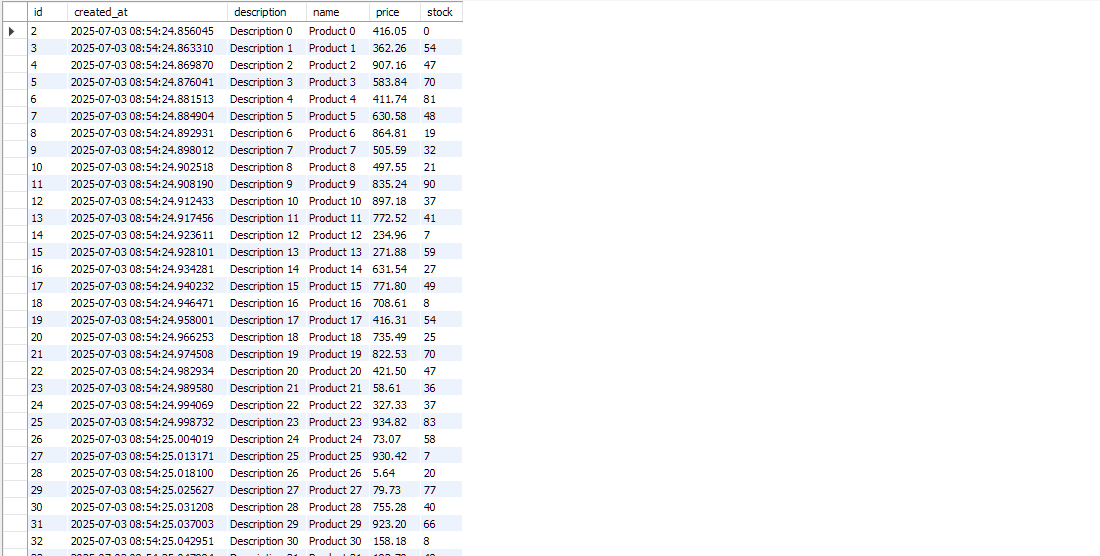
[1] MySQL: saveAll + flush 과정에서 DB I/O + 트랜잭션 처리 → 상대적 느림
[2] Redis: 파이프라인 기반 대량 쓰기 → 네트워크 round-trip 최소화
3.2.3. 복잡한 쿼리 성능 비교
MySQL은 초당 121건의 작업을 처리하고, Redis는 초당 1건의 작업을 처리하였다.
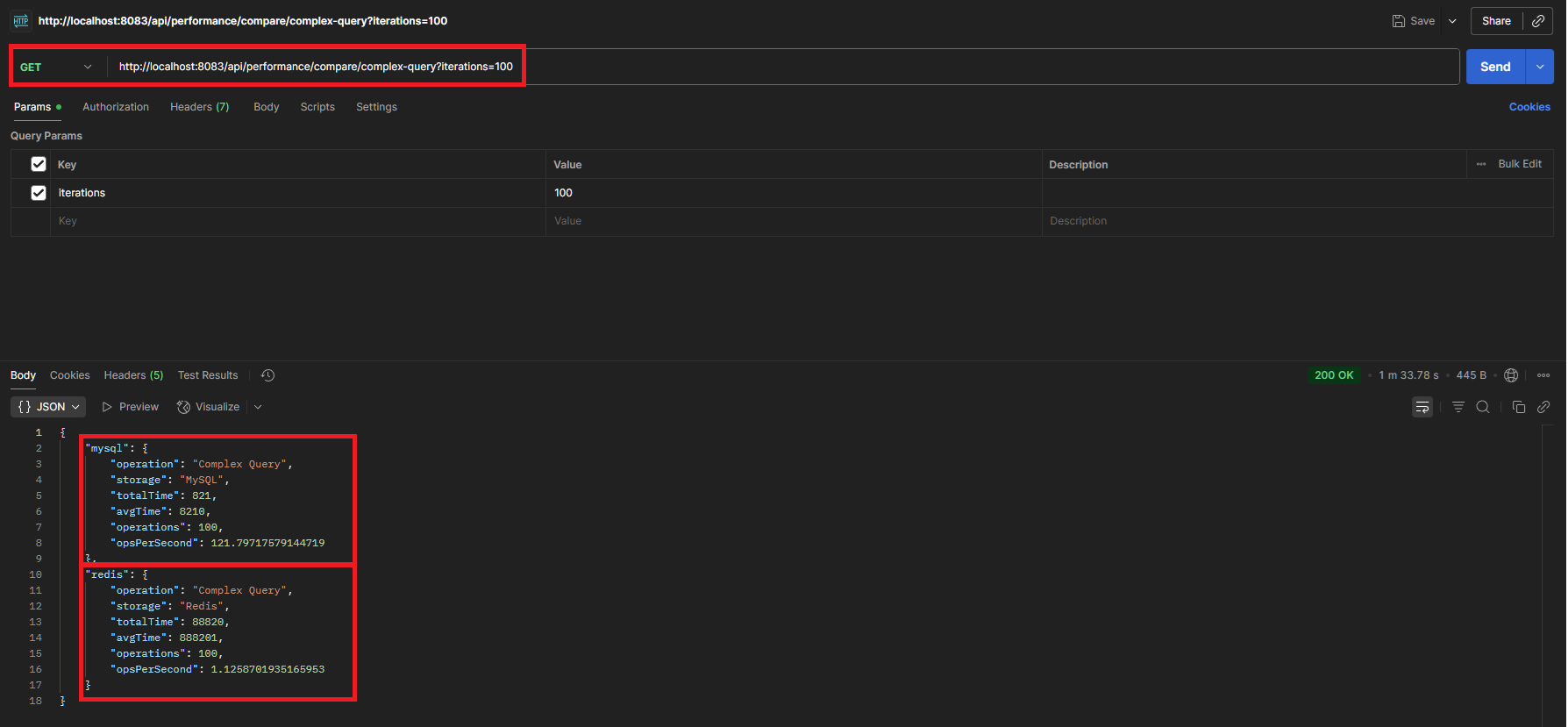
[1] MySQL: DB 내부 인덱스 + WHERE 절 최적화
[2] Redis:
- 매 요청마다 ZSet rangeByScore → ID 리스트 조회
- 파이프라인으로 개별 key 조회 (다수 GET 호출 발생)
- 네트워크 round-trip 누적 + ZSet range와 파이프라인 GET 결합의 비효율
[1] Redis는 RDBMS처럼 복잡한 조건 검색에 최적화된 구조가 아님
[2] Sorted Set + value 조회 결합 시 단일 range 스캔 + 다수 GET 이라 느림
[3] Redis는 단순 key-value, 캐싱, 단일 조건 인덱스 조회에 최적화됨
'Database > Redis' 카테고리의 다른 글
| [Optimization-2] 캐싱 개념 (2) (0) | 2025.12.28 |
|---|---|
| [Optimization-1] 캐싱 개념(1) (0) | 2025.12.28 |
| [Basic-4] 세션 관리 (0) | 2025.07.03 |
| [Basic-3] DB 병렬 작업과 Lock 전략 (0) | 2025.07.03 |
| [Basic-1] 기초 이론 및 구축 실습 (0) | 2025.07.01 |